> ## Documentation Index
> Fetch the complete documentation index at: https://docs.tierzero.ai/llms.txt
> Use this file to discover all available pages before exploring further.
# Overview
> Connect TierZero as a remote MCP server to MCP-compliant clients such as Claude Code, Cursor, or any HTTP/OAuth-aware client.
## What it is
TierZero exposes a remote Model Context Protocol (MCP) server. AI coding assistants — Claude Code, Cursor, and any other MCP-compliant client — can call it directly to query your production context while you work.
* **Endpoint:** `https://api.tierzero.ai/mcp/`
* **Transport:** Streamable HTTP
* **Auth:** OAuth 2.1 (recommended) or Personal Access Token
## What it does
The server exposes two tools.
### `tierzero_ask`
Runs a TierZero investigation against your connected production systems and returns evidence-backed findings. It can:
* Query logs, metrics, traces, and spans from connected integrations such as Datadog, New Relic, CloudWatch, Grafana Cloud, and Sentry
* Inspect GitHub repositories, CI/CD systems such as BuildKite and GitHub Actions, and workflow orchestration in Temporal
* Retrieve documentation and runbooks from connected knowledge sources such as Confluence, Notion, and Slack
* Correlate findings across telemetry, code, workflows, and documentation
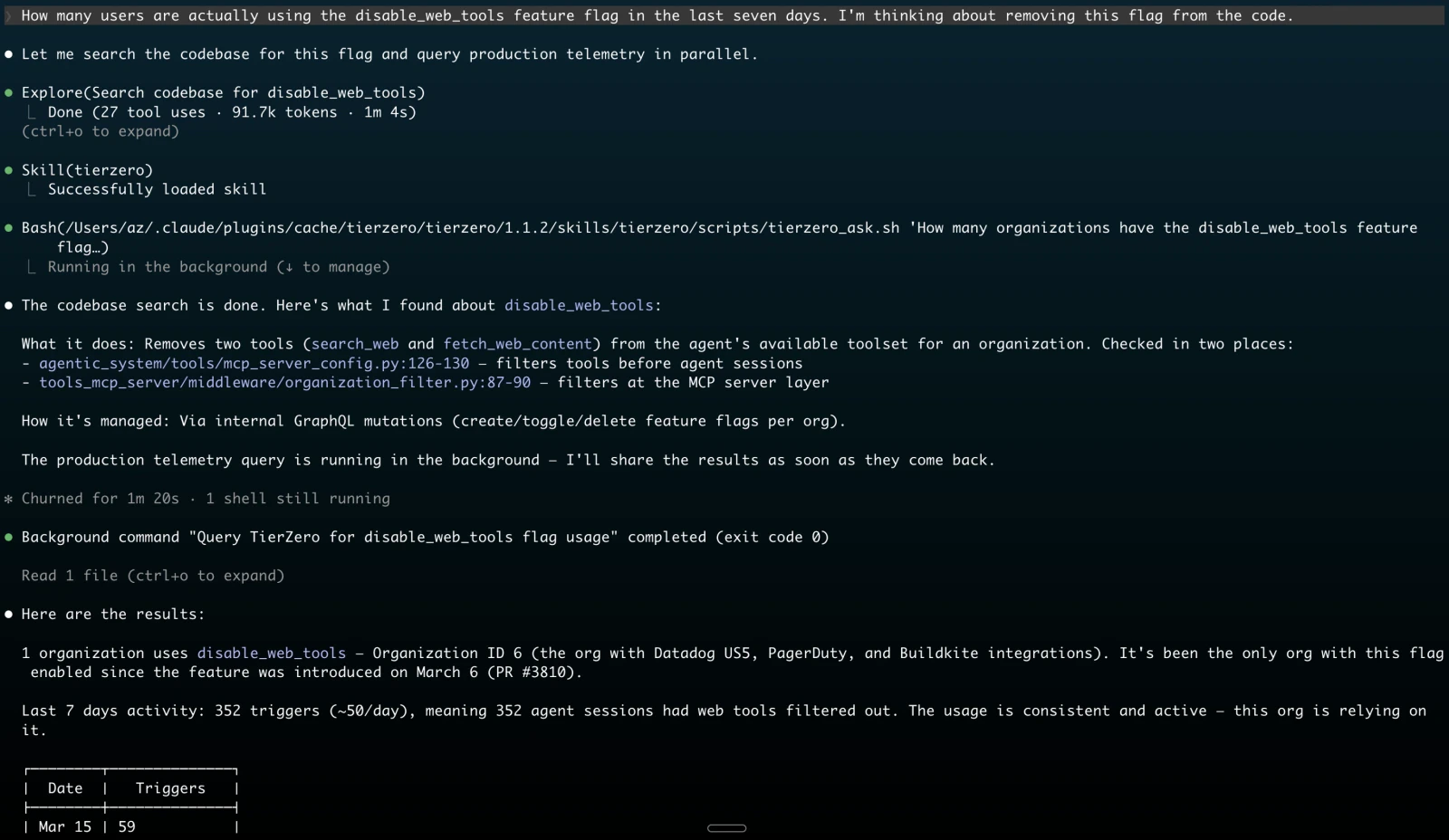 `tierzero_ask` invokes the TierZero agent, which may take several minutes for non-trivial queries. Clients that support MCP progress notifications will display progress updates during execution.
### `tierzero_fetch_context`
Loads an existing TierZero chat, investigation, digest, or artifact into your IDE so you can act on it without starting a new investigation.
`tierzero_ask` invokes the TierZero agent, which may take several minutes for non-trivial queries. Clients that support MCP progress notifications will display progress updates during execution.
### `tierzero_fetch_context`
Loads an existing TierZero chat, investigation, digest, or artifact into your IDE so you can act on it without starting a new investigation.
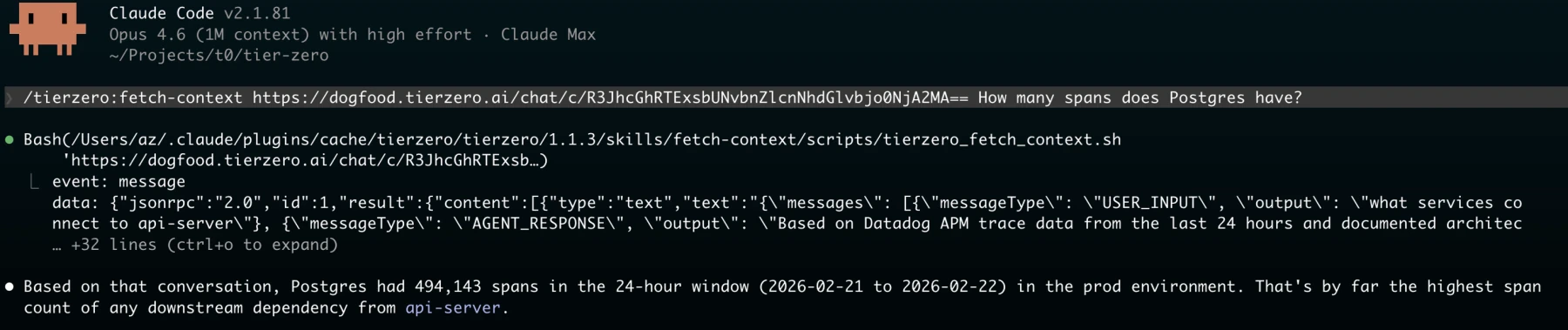 Arguments:
* `url`: A TierZero chat URL (`https://app.tierzero.ai/chat/c/`), investigation URL (`https://app.tierzero.ai/investigations/`), digest run URL (`https://app.tierzero.ai/digests/run/`), or raw GlobalID
* `include_sources`: Optional boolean. Set to `true` to include source metadata in the response
## Choosing a client
Pick the setup guide that matches your client:
Plugin install + OAuth. Recommended for Claude Code users.
Cursor marketplace install + OAuth.
Any HTTP MCP client. OAuth 2.1 or PAT.
## Troubleshooting
### Authentication didn't pop up
Run `/mcp` in Claude Code, or open the MCP panel in Cursor settings, and click **Authenticate** on the `tierzero` server.
### Token expired or revoked
Reconnect from the same place: `/mcp` in Claude Code, or the Tools & MCP panel in Cursor. The client will start a fresh OAuth flow. If you're using a PAT, generate a new one at [auth.tierzero.ai/account/api\_keys/](https://auth.tierzero.ai/account/api_keys/) and update your client config.
### Connection issues
Confirm `https://api.tierzero.ai/mcp/` is reachable from your network and that your client supports HTTP transport. Older MCP clients that only support stdio transport are not compatible with the remote server.
Arguments:
* `url`: A TierZero chat URL (`https://app.tierzero.ai/chat/c/`), investigation URL (`https://app.tierzero.ai/investigations/`), digest run URL (`https://app.tierzero.ai/digests/run/`), or raw GlobalID
* `include_sources`: Optional boolean. Set to `true` to include source metadata in the response
## Choosing a client
Pick the setup guide that matches your client:
Plugin install + OAuth. Recommended for Claude Code users.
Cursor marketplace install + OAuth.
Any HTTP MCP client. OAuth 2.1 or PAT.
## Troubleshooting
### Authentication didn't pop up
Run `/mcp` in Claude Code, or open the MCP panel in Cursor settings, and click **Authenticate** on the `tierzero` server.
### Token expired or revoked
Reconnect from the same place: `/mcp` in Claude Code, or the Tools & MCP panel in Cursor. The client will start a fresh OAuth flow. If you're using a PAT, generate a new one at [auth.tierzero.ai/account/api\_keys/](https://auth.tierzero.ai/account/api_keys/) and update your client config.
### Connection issues
Confirm `https://api.tierzero.ai/mcp/` is reachable from your network and that your client supports HTTP transport. Older MCP clients that only support stdio transport are not compatible with the remote server.